http://www.ebookanoid.com/2012/07/17/which-ereader-should-you-buy-a-short-look-at-the-points-to-bear-in-mind-when-choosing-an-ereader/
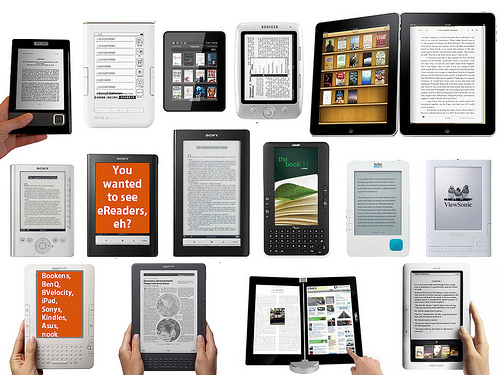
I have not actually used any of the ereaders myself – you know, the Nook, Kindle, etc. Have you? What are the pros and cons of these devices with regards to crochet? Are they good for reading patterns from? Are they suitable for reading a crochet magazine or crochet book like a stitch encyclopedia? Is the picture crisper in black and white or does it work equally well with color? Is it worth the investment for someone whose main use would be for crochet related reading?
I’ve read the pros and cons for using ereaders for other uses – but I’m mostly interested in these devices as they relate to my primary intended use – crochet. Do they add anything to the process of following a pattern? Do they detract from that?
I feel sure that many of my readers use these devices. I’d love to hear from well informed readers who use their devices for crochet as well as any other purpose. Please take the time to add specifics, links, pros and cons, and any other information you think will assist others (me!) in determining if an ereader is a good investment for crochet purposes -and even which device is the best for this purpose. Thanks in advance for sharing your wisdom!
OK, I have a color Nook and an iPad on which I can read my Nook downloads. I do have some magazines downloaded and they are crisp enough and clear enough but…
Both devices are heavy so they have to be sitting/standing/lying on a solid surface while one knits/crochets/ embroiders/whatever adn I find two disadvantages to using them as opposed to magazines or photocopies of patterns: they have a habit of “flipping” if you turn the device to see the pattern from a different angle so you are basically stuck with the format the item was published in … and 2) the devices do tend to “go to sleep” after a time, meaning you have to constantly refresh them.
An advantage— you can magnify a chart of pattern if you want on a reading device and if the magazine is a clear copy on line, that is a whole lot easier than trying to enlarge it on a copier!
Personally, I prefer hard copy… I can twist and turn the pattern any way I want to match how I have my working piece (I do a lot of embroidery and sometimes a quarter turn of a piece is necessary for even stitching — and you just can’t turn a reading device – or at least *I* cant – that quarter turn without it reverting back to it’s published arrangement).
I have an iPad and I love it. I do use it to read patterns and I also like that I can zoom in.
@Carol Harper the iPad has a switch on the top left side that makes it so the picture won’t flip. That might help you turn the picture to the way you want it.
Oops sorry the switch is at the top right side. 🙂
I had Kindle Fire for a while and hated it. Unless the book or pattern is a PDF, the pictures and diagrams can be somewhat misaligned or oddly placed with the text. Magazines were okay. PDF is better but zooming doesn’t scale the text so it can get distorted.
I switched to Nexus 7 and there are more magazines available, the screen can be locked from switching orientation easily, any existing Nook or Kindle books you have can be read via those brands’ apps. You can also leave the book/etc, use another app, then come back right where you left off very easily. You can get cases that will make these types of tablets stand up for easy reading (like a cookbook stand). I am much happier with this device.
I have a Nook tablet and while a larger screen would be better, I kind of like putting PDF patterns on it, it works out nicely. Magazines are hit or miss, though. Some large charts are difficult to follow on a high enough magnification for me to see clearly.
I have a Sony tablet which, while not designed for mostly dedicated reading, I use for just about everything in patterns. I agree with Carol, above, about the going to sleep and the turning. I found out, though, when I’m using this for a pattern I merely change the time on the sleep mode and I lock the screen so it doesn’t turn when I move the tablet. I’ve used my mom’s Kindle Fire for looking things up and found it almost the same. I didn’t mess with her settings so I can’t give you a description on that.
The pictures are easy to enlarge and very clear, on my tablet (caveat: my screen is 10″)
and so details are simpler to check on.
I haven’t yet gotten a digital magazine, but I’ve only had this 2 months, heh. I’ve been integrating it into my life so far. As soon as I find one I want, that’s my next new experience!
I have a nook tablet and use it all the time. Yes, it will go to sleep but you can change the timing on that and it does flip but for most patterns that is not an issue. I like it because it’s portable, easy to use, and you can add memory cards to it. The color is great and you can zoom if needed. It also plays videos very crisply which is great for “how-to” videos you’ve downloaded from youtube, etc. I use a standing plate/photo holder to prop mine up if needed.
My favorite toy honestly.
I have the basic Kindle and an iPad. I use both for viewing patterns and love it. If you lock the iPad it won’t rotate.i enjoy the ability to take my patterns wherever I go and they don’t get torn or lost. I have many patterns and they all fit in a small area on ipad or kindle. If I’m away from home and see a pattern I like online it’s a snap to save it. You can mark where you are and keep track of rows then erase markings when finished. It’s great to use these small gadgets to store an endless number of patterns.
I actually have the Acer Livonia Tablet. I use it…a lot….to save PDF patternns. Both crochet and knit. Along with lots of books. I love my tab! 🙂
I do not have an opinion on this, but I am getting a Nook for Christmas with the instructions to check out which one I would like to have. – that we can echange the Nook if I think I want a Kindle or other device instead. So I am very glad you asked this question and will be reading all the comments too – THanks to everyone!
I have a Kindle and absolutely adore it for reading but when it comes to crocheting/knitting I don’t buy pattern books on it simply because I haven’t found a way to print it out anywhere! Unless it’s a very simple pattern, I need a printed copy at my elbow! Good luck!
I never learned to read a pattern. I routinely use my samsung reader to zoom in on the pattern so i can see every crochet stitch. This was really useful with both of the recent scarves you posted. I can’t zoom in on a magazine i purchase at the store so i wont get them.
I have a sony ereader. I like it for pdf patterns but not as much for magazines. It is black and white, which my optometrist recommended because it is not as hard on your eyes as the color if you will be using it a lot. I like that you can zoom into the patterns, I use it for knitting. I have not found that it is too heavy and I have also been able to adjust the settings so it will not go to sleep on me.
I hope you enjoy whatever you get. I got mine last year for Christmas and I have never used a non-work related electronic device so much.
I highly recommend buying one that is not “tied” to a certain vendor, one that can read regular pdf files, and one that has its own backlight. After much research, I chose the Sony e-reader.
I love having patterns and books on my ipad because my eyes seem to change daily and I can zoom in to better use any pattern that I am using and I have a cover for it that also makes it a stand and mine is not heavy at all…it really does help me to crochet more
I have a nook dual processor and a kindle fire hd both are 7″ screen. I carry and use my kindle more than the nook. The only advantage between the two to me is the nook has expandable storage up to 32k and the kindle fire does not. Crocheting with both is great with the sizing up or down on both and you can lock the the screens. Me, kindle fire hd if you have the money they make a fire with a 9″ or so screen but it is about $250??? cost of a laptop for me.
I have a Kindle Fire and I love it! I use it to go on Ravelry with wifi all the time – to update my projects, to post on the discussion boards, and to look at yarn requirements for patterns.
I use it to read PDF patterns as well as crochet and knitting ebooks. (Those can be Kindle books or other types of ebooks with converters.) The ease of reading depends on the formatting. I like that I don’t have to waste paper to print out a pattern and that I can have access to it from various places, but it isn’t always that easy to resize (enlarge) the text depending on how the patterns are formatted. Similarly, crochet books are a mixed bag. Usually for Kindle the pictures are not on the same page as the text, so you may have to do some flipping around (which is easy to do and you can mark your location) to compare written instructions with step-by-step pictures, for example.
I got mine as a gift and honestly, I would never have bought one (mostly because I’m cheap). But now that I have one, I find it really useful and I use it all the time. I don’t think I would be as happy with an ereader that didn’t have web browsing capabilities, because, as I mention, using it to go onto Ravelry is a big advantage for me.
I’m reading and writing this off my Kindle Fire. I have used it to read patterns and crochet and knitting magazines. I also use it to go on knit and crochet sites. I had this for almost a year and I love it. It’s small enough to fit in my purse. The only drawback is that I need to be near wifi in order to go on the web. The color is great and the pictures are clear and sharp. I’d recommend it to anyone.
I have both a 16 GB Nook tablet (not the new HD version) and a Nook Simple Touch (not the backlit version). I absolutely love my Nook tablet for crochet and knitting patterns/books. I can access the same patterns and books on my Simple Touch as well, but I don’t like the ST’s black & white limitations. Most of my patterns and books have color photos, and I find that I want to see that color! It just helps me when I’m working on my piece, whatever it may be.
As for the screen orientation changing on either Nook, it’s easy to lock the screen. Same for the screen timeout. I don’t have a problem with either of those features.
I’m a really anal person, & I’m relatively new to crochet & knitting, so I ALWAYS make notes to myself in both my e-books and my e-patterns. (Perhaps it’s a note about the brand of hook/needle I’m using with a particular yarn or additional instructions about a difficult part of the pattern or notes about something that I’m likely to misinterpret next time around or comments/errata that I’ve found on the internet about the pattern, etc.) Also, I’ll frequently highlight a section of the instructions (perhaps my size in patterns that have multiple sizing info) in my e-books and e-patterns. I love having those commenting features available on my Nook.
That’s where I sometimes find things frustrating, especially with PDFs. There are some PDFs that will not allow any type of commenting. I find that extremely frustrating – but it’s not my Nook’s fault. That happens depending on the type of security settings that a pattern designer or seller sets for the PDF. If I find that my e-pattern/e-book is locked for commenting, I have had some success by simply contacting the seller/designer & asking to if she/he will send me an unlocked version on which I can make my comments. I know that designers/sellers need to protect their patterns from unscrupulous folks who will steal & re-sell designs, so I understand. If the designer/seller won’t let me have an unlocked copy, I just save my notes in a WORD document with a similar file name as the pattern, so that I can keep the files together & still easily find my notes.
As for the magazines, I now receive all my craft magazines electronically, too. I find that viewing the magazines with certain e-reader apps is better than with others. I just play around until I find the one I’m happiest with.
Another feature that sold me on the Nook brand is having the ability to expand the tablet’s memory limitations via micro-SDHC cards. Theoretically, I can save zillions of books & patterns on different cards & just switch out my cards at will.
Since I started using my Nook for my crochet/knitting patterns, I find that electronic patterns/books are now my preference. I already have a large library of hard-copy patterns and books, and since I now go electronic if at all possible, I’m making more room for my yarn!! That’s a win-win for my yarn addiction – I have more yarn, so I need more patterns, so I need more yarn…! 🙂
I also love to read, so I use both my tablet and my ST to store hundreds of ebooks for my reading pleasure. I’ve certainly gotten my money’s worth out of both devices!
I have used the Kobo, hated it, I have a Pocket Edition of the Sony E-Reader and absolutely love it. I have some knitting and some crochet patterns in it. I love that it is so user friendly and the font can be changed to whatever you want. After 7 of my friends saw my E-Reader, they also got one of the same, because of how easy it is to use. You can put any pattern or recipe into it and call it up, and there it is. Hope this helps
I have had a Kindle for a year and loved it so much that I got a Kindle Fire last week. I have one crochet book on it. Hubert’s Granny square book. I also have it in paper. I like having it so I don’t have the book in my bag. The downside is that the picture, graph and written out pattern are all on different screens. Because of that I would think twice about getting other pattern books.
There is also some inexpensive, self published patterns on Amazon that I haven’t seen other places. I could see getting the Kindle app for my computer.
One thing to remember about the Nook and Kindle, you can only display their own books. You can’t get the other company’s material on the e-readers. Other e-readers like the Nexus you can get both company’s material. So you have to figure out where you get your digital material.
My cousin had a simple nook and wanted to upgrade. She didn’t want a Nook again so she got a Galaxy.
Consumer Reports has some good material out about Electronics right now that lets you think about what you want.
My only experience is with Amazon, but I know I had problems the other day and I was able to talk to someone and she spent almost an hour showing me what to do. I learned a lot more about my Kindle Fire. I am not very good with fancy equipment, so I like something easy to use.
Marillyn in Burien, WA
I’m very interested in this discussion. I don’t have a tablet or ereader yet, but am thinking of getting one as my holiday present to myself. A lot of them seem to have a 16K and a 32K version – how much memory do people find they practically need on their tablet? I’m leaning towards the Nexus 7 so I won’t be tied to either kindle or nook format. The 16K version is $50 cheaper, but will I regret it?
I have an iPad 3 and a Kindle. I really love my iPad, I take it everywhere! And I use Goodreader for all my crochet ePatterns. I have the Kindle app on my iPad also and do have some crochet pattern in the Kindle. Besides crocheting I love to read. The iPad after a while is just too have to hold in bed to read. So I got a Kindle ($69.00 one). For reading I love it, but since it is only black and white I don’t like doing my crochet patterns on it. If I didn’t have the iPad I would ask Santa for the Kindle Fire HD. I did ask him for a Kindle with a light.
I had a nook color and absolutely LOVED it! I love to read and loved having all those books at my fingertips! I recently gave my Nook to my almost 15 year old daughter when I got my iPad, as I have the nook and kindle apps on my iPad and read from it now…I would highly recommend an ereader if you love to read like I do!!
I used a friend’s kindle and didn’t like it much – I greatly prefer the free apps on my laptop. Since the laptop goes with me everywhere, it’s one less thing to worry about.
I have an ipad (1st generation) and love it for my patterns. I can read all magazines no matter what version and I also have my patterns sent to it as well. I have an app called Good Notes that I use for my patterns, it allows me to hi-light sections after I have completed them and also to write any kind of notes on it as well as I am going along. If I need a certain section enlarged it is no problem. I have a dollar store plate holder that I have sitting on the table next to me that I stand the ipad up in. This allows me to be “hands-free” so I can read the pattern and work along. I also like how I can go to Ravelry or any other site and download patterns if I am traveling. Yes it is a little heavy which is the only drawback. I have gotten used to it in my purse and I am never without it. I can also save my Joanns coupons to it so not only do I have my print version when I go to the store I also have my ipad coupons which they will use as well. Double the coupons double the savings!!
I *just* got a Kindle Fire. I haven’t put any patterns on it yet, but if you want to see it, let me know and I’ll bring it to crochet club in January. (There will be patterns on it by then. I expect to use it for patterns, just haven’t gotten there yet.) I think it’ll be especially great for charted things.
Just have to add my comment. I have a Kindle Fire and I LOVE it!! I do have patterns on it and magazines. I can stop the flipping, there is a control for that. If I find a pattern on my laptop and want to save some ink and paper I can send it to my kindle. I think that is a very cool feature. I’ve recently picked up a couple of the digital issues of Mollie Makes, which I love! If I need a template, the magazine has it available online, so I can just print it out.
Now the only complaint I have with the magazines is, I wish there was a way I could just “clip” what I wanted to save and delete the rest of the issue. Oh well, I guess we can’t have everything!
By the way, there are some old, old crochet, knitting, etc., books to download on some of the freebie sites. Love that vintage style!